hi guys… first and foremost… this is my first post, idk if this is the right section… but here it goes…
i’m working on a project… it’s a game programming library, focusing on portability in the java environment… i am currently working on the display function… as a system dependency, J2SE can use OpenGL for its graphics functionalities such as display or for rendering, etc…
i’m not doing things from scratch, my adviser (now on temporary leave) told me to look for some open source libraries in the Internet to lighten my load… I found LWJGL which provides classes and interface for OpenGL… so i use it for the J2SE OpenGL module of my library…
the program i’ve written so far works perfectly for basic polygon rendering in both OpenGL and native hardware accelerated graphics… however, when I proceed to image rendering there seems to be some problem…
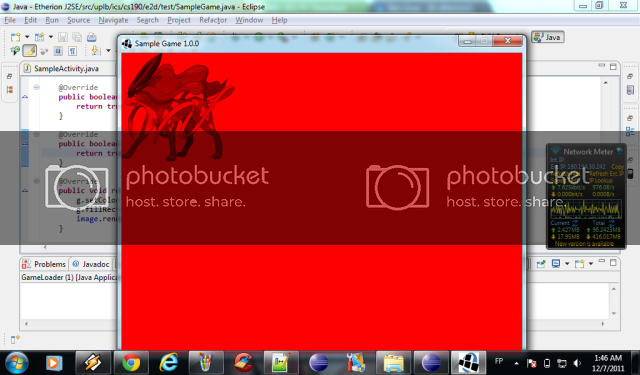
the image above shows the output after i run the OpenGL rendering program…
here is the code for initializing LWJGL
private void initGL() {
		GL11.glEnable(GL11.GL_TEXTURE_2D);
		GL11.glDisable(GL11.GL_DEPTH_TEST);

		GL11.glMatrixMode(GL11.GL_PROJECTION);
		GL11.glLoadIdentity();

		GL11.glOrtho(0, this.size.width, this.size.height, 0, -1, 1);

		GL11.glEnable(GL11.GL_BLEND);
		GL11.glClearColor(0, 0, 0, 0);

		GL11.glBlendFunc(GL11.GL_SRC_ALPHA, GL11.GL_ONE_MINUS_SRC_ALPHA);
	}

	private void initGraphics() {
		try {
			DisplayMode best = (this.isFullscreen) ?
					this.getBestDisplayMode(size) : new DisplayMode(
							this.size.width, this.size.height);

			if(best == null) {
				throw new Exception();
			}

			org.lwjgl.opengl.Display.setDisplayMode(best);
		} catch(Exception e) {

		}

		try {
			org.lwjgl.opengl.Display.setTitle(this.title);
			org.lwjgl.opengl.Display.setFullscreen(this.isFullscreen);
			org.lwjgl.opengl.Display.setVSyncEnabled(this.usingVsync);
			org.lwjgl.opengl.Display.create();
		} catch(Exception e) {

		}
	}
and here is the code for rendering the image:
public boolean drawImage(Image img,
							 int x, int y, int width, int height,
							 ImageObserver observer) {
		startPainting();


		GL11.glPushMatrix();

	    Texture texture = textureLoader.getTexture((BufferedImage) img);
		texture.bind();

		GL11.glTranslatef(x, y, 0);

		GL11.glBegin(GL11.GL_QUADS);
			GL11.glTexCoord2f(0, 0);
			GL11.glVertex2f(0, 0);

			GL11.glTexCoord2f(0, texture.getHeight());
			GL11.glVertex2f(0, height);

			GL11.glTexCoord2f(texture.getWidth(), texture.getHeight());
			GL11.glVertex2f(width, height);

			GL11.glTexCoord2f(texture.getWidth(), 0);
			GL11.glVertex2f(width, 0);
		GL11.glEnd();

		GL11.glPopMatrix();


		endPainting();

	    return true;
    }
oh btw here is how i called the rendering routine:
public void render(Graphics g) {
		g.setColor(Color.RED);
		g.fillRect(0, 0, 640, 480);
		image.render(g, 0, 0);
	}
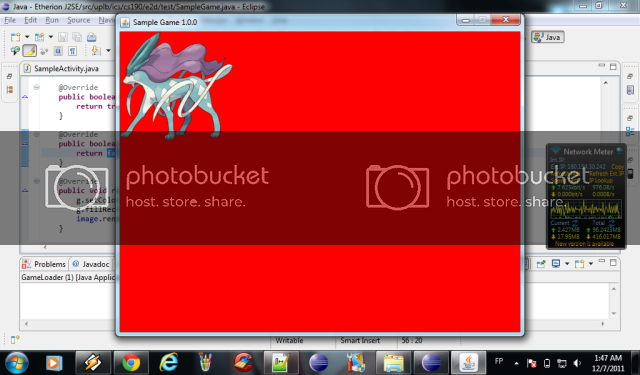
any help to make the OpenGL rendered image look exactly like the image below? thanks in advance