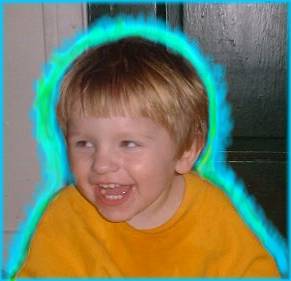
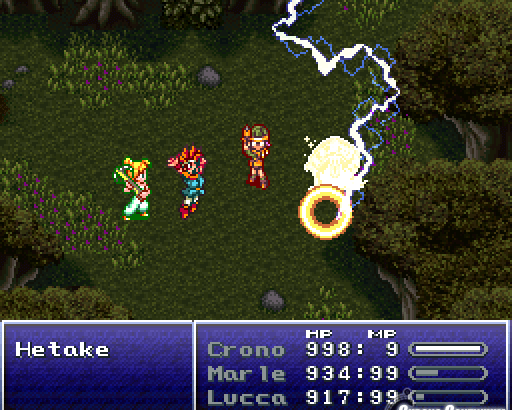
If you don’t want to use shaders and the same effect as in your second image is enough the first thing that comes to mind is draw the character a little bit bigger with a glColor3f on them and then draw the character on top of that
I would render the character with a lower ( lower lower ) resolution then apply some kind of shading : blue tint for exemple ( without shader inded ) and merge all for final result : blue one sampled back to original resolution (with interpolation) with original character one
No need to disable depth buffer, just either draw the glow quad further away (bump the z-coordinates or use glPolygonOffset), or set your depth test to LEQUAL and draw the glow quad first.
You really don’t want to render your object a little bigger. It will look like a drop-shadow from a lightsource near the object.
What you really want, and what is more difficult to achieve, it so grow your object along it’s edge normals. Once way of doing that, as DzzD said, is to ‘mipmap’ your image, and probably add a glow/blur effect in screenspace, but not on the framebuffer, as it will make the glow visible on top of the object.
Thank you for the suggestion, but I’m pretty n00b in Opengl in general, could you guys be a little more specific on what I should use, i.e. which glFunction combined whit which buffer ?
I tried Micklukas’ suggestion, it worked almost nice, but indeed there are some problems , it does not look quite exactly what I expected .
Then it’d be weird indeed. The pictures on the second screenshot looks easy enough though Dunno what the requirements are in the game which is why I gave a simple example.
you can do a few things. Its seems like a really easy task.
multitextureing: very simple. Single pass to a quad, with two textures.
Single Image:
i. Make the images PNG files, make the alpha value the outside color you desire (so in the example make the alpha color red). You can do this is GIMP by making the color you plan to turn alpha red, then select the red region, then cut it, even though you cant see the alpha color, when you save the file the alpha will save as red.
ii. turn alpha testing on, when you want to show the outside color, set the alpha test to pass lower values, then when you render normal without the border, make it pass only high alpha values.
(ii. is alot easyer than it sounds it only requires two GL calls). If you dont want transperancy around the glow, turn blending off.
edit: Im not sure of the best values to use, you might want to adjust alpha level (in Gimp->color levels). the pixels around the edge will have a higher alpha value than the ones not connected to pixels that way.
[quote]But then I’d have to disable writing on depth buffer, otherwise I would see only the bigger one.
[/quote]
3. thats not a problem you can get around it by doing something like this:
Leave Depth Testing ON -> depthMask(false) -> big image -> small image -> depthMask(true) -> colorMask(false) -> big Image -> colorMask(true);
Im wondering how you are handling textures in 2D. I find its not good to let depth testing handle 2D rendering, I find it much nicer turning Depth testing off for 2D, and rendering in order farthest to closest. Otherwise if you ever want to deal with particles and transperancy your in for a world of pain.
Thank you for the replies, but … I guess I failed badly at explaining my problem . It’s not a 2d World, but a 3D world .
That’s why Mickelukas suggestion sounded reasonable. If it worked as desired it would cause the glowing effect no matter at which angle I looked the character .
If I could grow from the normals it would work great, but I’m not sure how to do it . Maybe I’ll go with “mipmapped” version described by DzzD .
In that case, just use lines, set an increased line size, set the color of the line. and basically do the same thing i recommended for 2D (idea 3). but instead of big image small image, lined mesh polygon line(large) mode, regular mesh polygon fill mode.
Something like:
Leave Depth Testing ON -> depthMask(false) -> disable Texturing -> set line mode -> increase line width -> render mesh -> depthMask(true) -> set fill mode -> enable Texturing -> re-render mesh -> colorMask(false) -> set line mode -> render mesh -> colorMask(true); -> set fill mode
you might need GL_LINE_SMOOTH, or render points aswell. I have never needed to do this myself, so im not sure about the appearance of the outcome.
Alright ! That worked exactly as I wanted, thoug I skipped some of the steps (the ones not in bold, which I actually didn’t quite understand why to use them)
depthMask(false) -> disable Texturing -> set line mode -> increase line width -> render mesh -> depthMask(true) -> set fill mode -> enable Texturing -> re-render mesh -> colorMask(false) -> set line mode -> render mesh -> colorMask(true); -> set fill mode
Thank you again bobjob and everybody who gave suggestions .
the steps that are not in bold, are to write the “border glowy bit” to the depth buffer. so that if an object is drawn behind the current 3D object later, it wont be drawn over the line border. Otherwise it will automatically pass the depth test.
currently only the filled object is writing to the depth buffer.