OpenGL problems when converting from JOGL to LWJGL

I’ve recently decided to switch my code from JOGL to LWJGL.
Now that I’ve almost converted all my code from JOGL to LWJGL (makes it sound harder than it was), I’ve run into some problems.

It seems to me that the two libraries are using different OpenGL standard settings (different initial states).
I’m not 100% sure, so I would like confirmation on this, if possible.

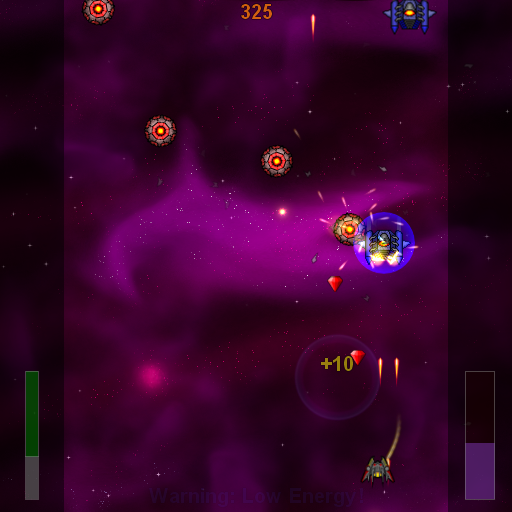
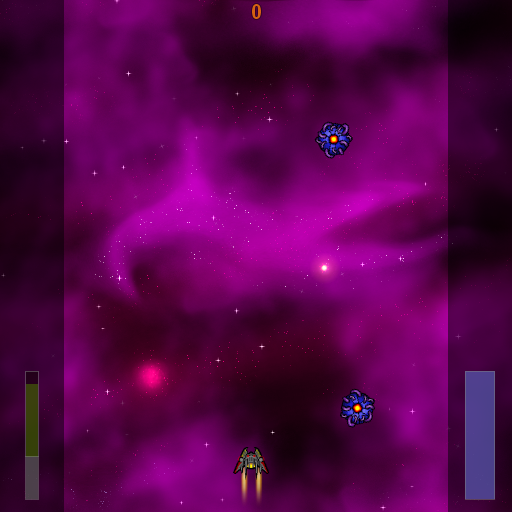
Anyway, the problems is that much of my graphics seem brighter/more opaque in LWJGL compared to JOGL.
I think it could be related to blending, smoothing, scaling and similar stuff, but all my attempts at fixing this inconsistency have failed.
I would like to understand the reasons for this inconsistency, as well as be able to make portable code between these two libraries.

All help / comments are much appreciated :slight_smile:

  • Scarzzurs

Got any screenshots showing the differences?

Kev


The “clouds” and glow around bullets-glow are much brighter in LWJGL version. (Although both are dynamic)
Interestingly enough, both use additive blending using:

GL11.glBlendFunc(GL11.GL_SRC_ALPHA, GL11.GL_ONE);

Hmm…

[Edit]No wait, only the bullet and the bullet-glow use additive blending[/Edit]

  • Scarzzurs

I would guess at texture loading differences - how are you loading your textures in the two different versions? It may be that one loader or another is doing something funny by using premultiplied alpha (or not when it should be).

If you generate a texture at runtime (maybe just a linear alpha gradient) how does that look between the two?

In JOGL I had used the build-in texture loader class. As this didn’t exists in LWJGL, I had to implement my own. So this could very well be the cause.

My TextureLoader loads the image using ImageIO (from a png file), grabs the pixels using a PixelGrabber and stores them in a ByteBuffer called “pixels”.
Finally it creates a texture and calls:

GL11.glTexImage2D(GL11.GL_TEXTURE_2D,0, GL11.GL_RGBA8, w, h, 0, GL12.GL_BGRA, order, pixels);

Any ideas/thoughts on this approach?

  • Scarzzurs

Did you check the image format of what ImageIO loaded? IIRC it has a tendancy to prefer non-RGBA formats, so that could well be your problem.

For a quick test, I’d suggest using slick-utils texture loading, and see if that changes the result. http://slick.cokeandcode.com/downloads/util/

Maybe even easier to put this in your image loading code:


public static BufferedImage normalizeRGBA(BufferedImage source)
{
    BufferedImage target = new BufferedImage(source.getWidth(), source.getHeight(), BufferedImage.TYPE_INT_RGBA)

   // make transparent
   {
      Graphics2D g = target.createGraphics();
      g.setComposite(AlphaComposite.getInstance(AlphaComposite.CLEAR, 0.0f));
      g.fillRect(0, 0, target.getWidth(), target.getHeight());
      g.dispose();
   }

   // draw image
   Graphics2D g = target.createGraphics();
   g.drawImage(source, 0, 0, null);
   g.dispose();

   return target;
}

Right, the problem did indeed seems to be related to pre-multiplied alpha.

In my code I was working under the assumption that the colours of my textures wasn’t pre-multiplied.
With JOGL, however, this wasn’t the fact. The javadoc for the Texture class of JOGL even states:

[quote]The mathematically correct way to perform blending in OpenGL (with the SrcOver “source over destination” mode, or any other Porter-Duff rule) is to use “premultiplied color components”
[/quote]
However, as you stated, ImageIO prefered the non-premultiplied version.

So this indicates I should clear up my code to be consistent, and should choose whether or not to use pre-multiplied alpha.
I haven’t quite come to an understanding of why using pre-multiplied is “mathematically correct”, but at least I know how to fix my problems now.

Thanks a lot for the help guys. This could have taken me days to fix :smiley:

  • Scarzzurs

[quote=“Scarzzurs,post:8,topic:35893”]
http://home.comcast.net/~tom_forsyth/blog.wiki.html#[[Premultiplied%20alpha]]

(copy/paste the whole thing)

Physically correct perhaps, but there’s nothing more ‘mathematically correct’ about it. Plus it comes with downsides as well, such as not being able to change the transparency as easily on the fly, and the inability for most artists to wrap their head around it.

Swings and roundabouts, IMHO.

[quote=“Orangy Tang,post:10,topic:35893”]
The pre-multiplication can happen late in the development pipeline (or even in the shader for really dynamic stuff), which solves both of these problems.